Monthly Archives: April 2004

Computer Security: More Vulnerabilities in Windows XP


STAYSECUREWINDOWSXP


When Microsoft notified Windows XP users yesterday that Critical Updates were ready to install, through Windows XP’s built-in automatic update facility, it was absolutely critical and necessary that these updates were installed as soon as possible. Quick action is important when it comes to OS updates.
On Tuesday, Microsoft released four security bulletins, three of them critical. The associated patches fix a total of 20 vulnerabilities in Windows and the Outlook Express e-mail programme. The bulletins are part of the company’s regularly scheduled monthly release, but the number of reported vulnerabilities is significantly greater than usual. Click here to get the full list, and, if you’re a Windows user, instructions on downloading the patches. Here’s an AP story by Allison Linn with more details.

Computer Security: ZoneAlarm and McAfee Updates

zonealarm.jpg
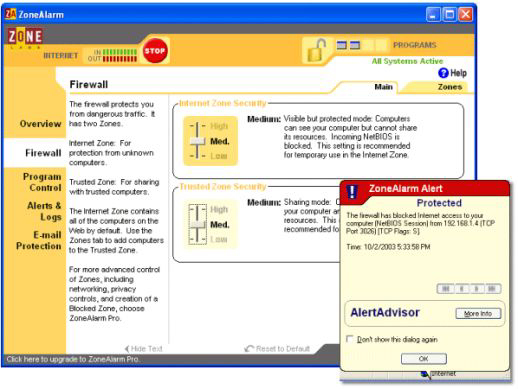
The folks at ZoneLabs announced a new release / upgrade of their ZoneAlarm Pro software programme, earlier today. For those who run this piece of software on their computer, and would you wish to avoid all of the re-registration rigamarole entailed in installing the upgrade (if an already existing ZoneAlarm Pro user), follow this set of instructions (employing your Internet Explorer browser), and all will be well. The University of Alberta provides a more graphical set of update instructions here.
While you’re updating your ZoneAlarm, you might as well update your McAfee Stinger (as you may recall, running McAfee Stinger is just one of the pre-conditions necessary to surf safely on the ‘Net). To install the latest version of McAfee Stinger, follow these instructions.

Computer Security: FREE Windows Update CD Arrives

windows-security-cd.jpg

Microsoft was good on it’s word, and mid-week, last week, the FREE Security CD that had been ordered — replete with all of the Windows Critical Updates through February 2004, including the Service Pack 1 (very handy!) — arrived in VanRamblings’ mailbox.
Note should be made that Microsoft’s Security CD does not contain any of the Recommended Updates. Further mention should be made that those using this disk as a pre-installation tool (‘pre’ going onto the ’Net, that is) should go to the Windows Update site a.s.a.p. to download the most recent Critical Updates, at which time the Recommended Updates could be installed. You’ll probably want to cherry-pick the Recommended Updates.
The Windows Security CD comes packaged with FREE Anti-Virus and firewall utilities, on a separate disk. The firewall, which Microsoft calls “EZ Firewall”, is simply a re-branded version of ZoneAlarm. You don’t have to install these programmes if you don’t want them. If you do, though, make sure you enter the license(s) after registering, or you’ll get a nag screen each time you reboot. Microsoft says the license is good for a one year period.