photo, copyright Strawberry Tea Productions, 2005 |
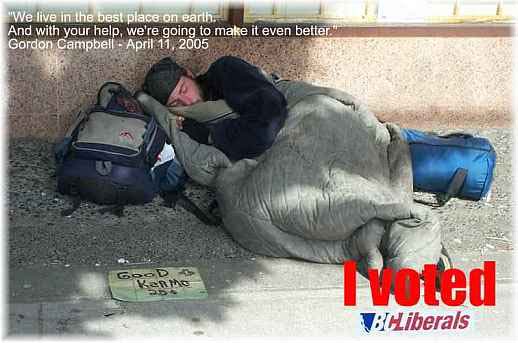
In the past four years homelessness across British Columbia has grown to such an alarming extent under the Gordon Campbell Liberal government that, for the first time, scenes such as the one above have become a common feature of the urban landscape. The deinstitutionalization of mental patients has succeeded in emptying government-funded beds, filling the streets with the chronically mentally ill, many of whom have been denied the most basic assistance from the Ministry of Human Resources.
While business and the wealthiest 10% of the population received a $3.5 billion tax cut, $350 million was slashed from the budget of the Ministry of Children and Family Development. The consequence?
Almost one-in-five children in British Columbia now live in poverty, an increase of 41% since 2001; that’s 167,000 children, more than the entire population of Victoria and New Westminster combined. The BC rate of child poverty, at 19.6%, is the third highest in Canada, significantly higher than the 15.6% for Canada as a whole.
In the past four years, the population of seniors has grown by 11%. Yet, according to a report from the Canadian Centre for Policy Alternatives …
- There has been a net decrease of 1,464 long-term care beds since the election of the Liberals in 2001. Between 2001 and December 2004, BC also cut 2,529 residential care beds, and closed 1,200 hospital beds, while BC’s aged population continued to grow. BC now has the lowest level of access to residential care beds in Canada for seniors aged 75 and over, falling 13 percent below the national average;
- The budget for home support (personal care) was also slashed, by 13% since 2001, while home care (i.e. professional nursing) was cut by 8%. In the rural areas of our province, the situation is even worse, as home support hours per client was 18 to 19 per cent below the provincial average.
The cuts have affected not only seniors but each and every one of us: working people, children, and the disabled in communities across British Columbia. Here’s a list of just a few of the devastating changes to the social, cultural and political landscape of British Columbia that have come to pass since the election of a provincial Liberal government in 2001 …
- The implementation of a $6 an hour training wage, in concert with the introduction of the most regressive child labour legislation anywhere in the western world;
- A $100 million budget cut in services to people with physical and mental disabilities, women fleeing abusive relationships, and children in violent homes;
- The elimination of funding for safe houses for 13 to 15 year old homeless, runaway children, as an uncaring B.C. Liberal government showed more interest in saving money than saving lives, and contempt for the safety of our most vulnerable, preyed upon, children;
- Cuts to the number of special education teachers by 17.5%, the elimination of 20% of ESL teachers, the closure of more than 100 school libraries, and the elimination of 23.4% of teacher librarians;
- Draconian cuts to legal aid, the closure of 37 women’s centres, plus 35% cuts, or higher, in funding to government oversight agencies such as the offices of the Ombudsman, the Auditor General, Information and Privacy Commissioner, and the Police Complaints Commission;
- The permanent, life-long banning of protestors from the British Columbia Legislature, meaning the very real crushing of political dissent in BC;
- The tearing up of legally-bargained-for collective agreements, and the Supreme Court of Canada decision just this past Friday to hear a case challenging a controversial provincial labour law, Bill 29, that allowed the Liberals to invalidate collective agreements, contract out work and lay off health-care workers;
- The erosion of basic rights to working people, including the elimination of overtime pay, stat holiday pay for part-time workers, and the repeal of pay equity legislation;
- The expansion of gambling in British Columbia, expected this year to take half a billion dollars out of the pockets of the most vulnerable;
- The sale of BC Rail and two-thirds of BC Hydro, and the attendant scandals surrounding each sale;
- The privatization of hospital services, leading to skyrocketing surgery wait lists, the loss of 7000 frontline health care worker jobs, and a radical decline in the quality of food and support services, and dietary and hygiene standards;
- The retreat from the promise of universal child care, with 57% fewer subsidized child care spaces, a 49% decrease in enrolment, and a 31% rise in fees.
This shameful list of degrading wrongs committed against the interests of all British Columbians could go on and on. What are we to do?
Over the course of the past four years, Gordon Campbell and his far right-wing, agenda-driven Lie-beral government has brought British Columbia to its knees. The time has come for all of us to stop living on our knees, and stand up and fight for the rights of each and every one of us, for a better and fairer British Columbia where social justice once again becomes a central tenet of a British Columbia by the people and for the people, where democracy shall not perish but flourish.
Take action.
Get up off your knees, and help someone else off their knees. Volunteer for the candidate in your local riding who is most likely to defeat the Gordon Campbell Lie-beral candidate. Work in office reception, canvass door to door, fold brochures, place signs for your candidate throughout your riding. There is so much that needs to be done to work for change.
You can change the world. Start today. Volunteer. We need you.